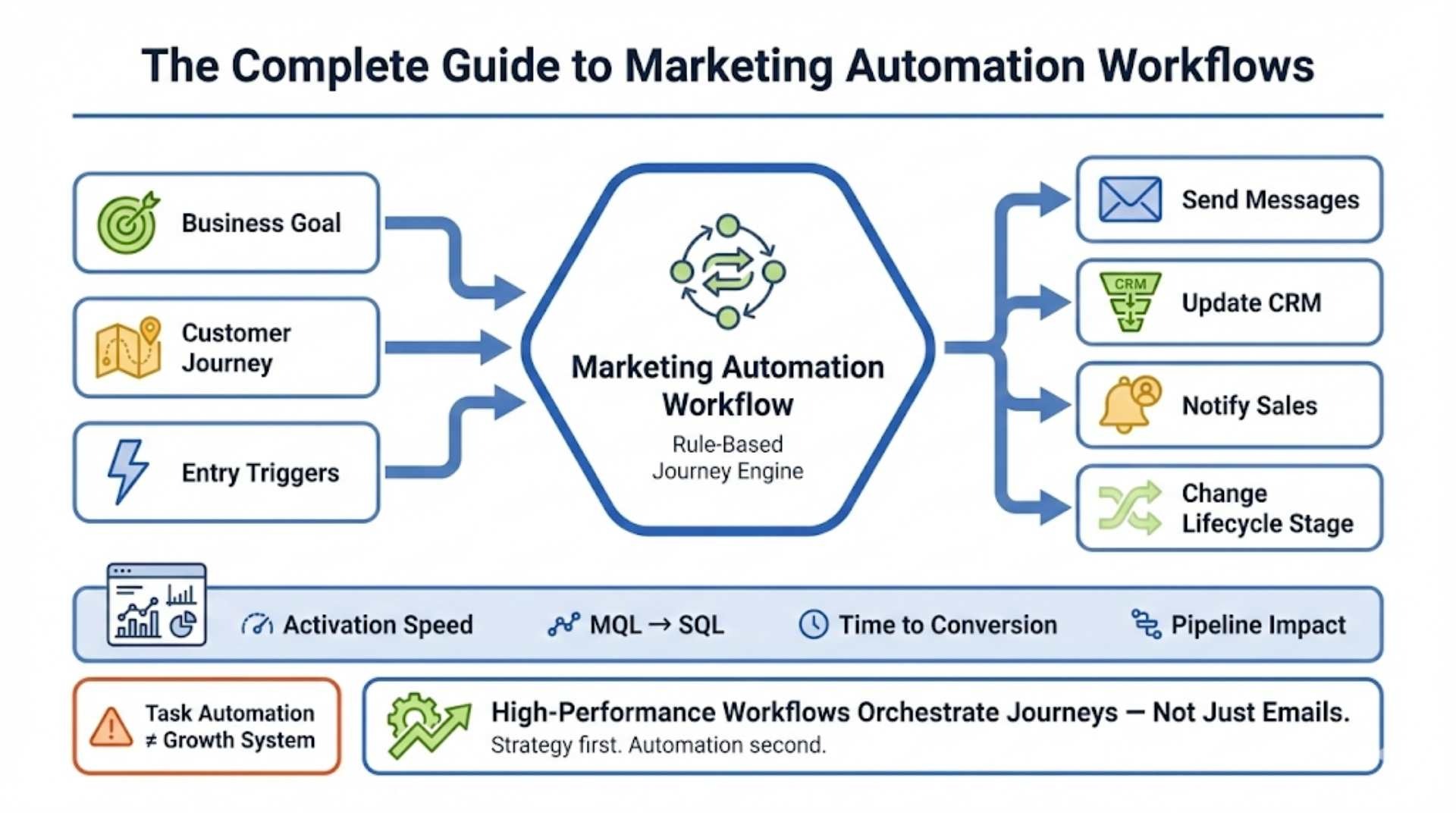
- A marketing automation workflow is a rule-based system that triggers messages, CRM updates, and stage changes based on user behavior.
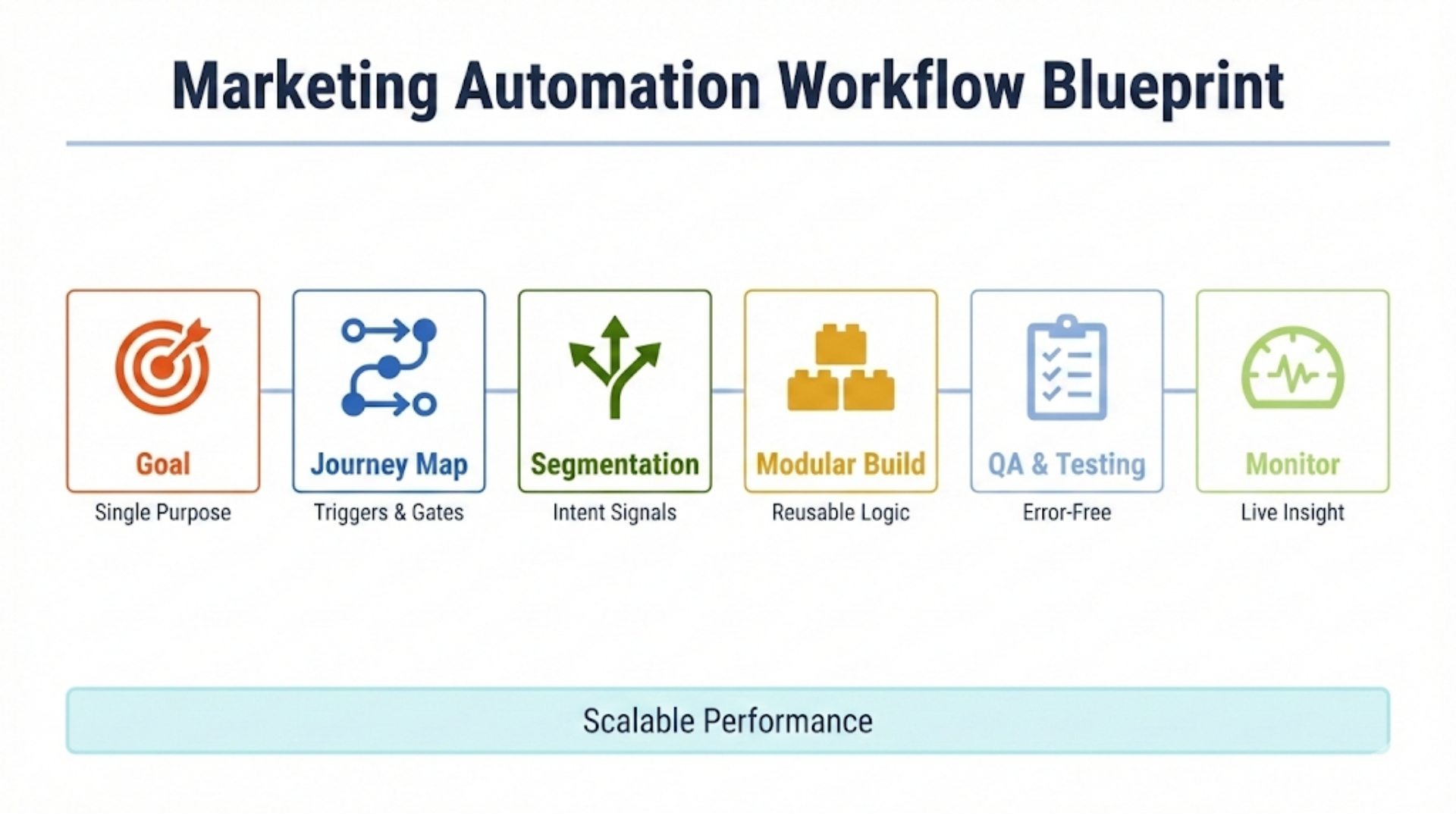
- High-performance workflows start with one defined business goal, a mapped customer journey, clear entry triggers, and explicit exit criteria.
- Workflow success is measured by funnel progression metrics like activation speed, MQL-to-SQL conversion, time-to-conversion, and pipeline impact.
Marketing automation workflows are the backbone of scalable, revenue-driven marketing. When designed correctly, a marketing automation workflow doesn’t just send emails; it orchestrates personalized customer journeys, accelerates pipeline velocity, and aligns marketing with real sales outcomes.
Yet most companies get this wrong. They automate tasks instead of building systems. They focus on tools before strategy. And they end up with bloated workflows that generate noise instead of growth.
In this guide, you’ll learn exactly how to design, build, and optimize high-performance marketing automation workflows, from strategic foundations to real-world workflow examples. This isn’t a theory. It’s the same framework we use at RiseOpp to help B2B and SaaS teams turn automation into a predictable growth engine.
If you want automated marketing workflows that actually move prospects through the funnel (not just “stay in touch”), this guide is for you.
What Is a Marketing Automation Workflow?
A marketing automation workflow is a structured, rule-based sequence of automated actions that guide a lead or customer through a specific journey, based on their behavior, attributes, and lifecycle stage, forming the backbone of modern B2B marketing automation strategies when scale and consistency matter.
Unlike one-off campaigns, marketing automation workflows respond dynamically to user actions. They can trigger emails, update CRM fields, notify sales teams, change lifecycle stages, or move contacts between segments automatically.
Common examples of marketing automation workflows include:
- Lead nurture workflows
- Product onboarding workflows
- Re-engagement and win-back workflows
- Cart abandonment workflows
- Post-demo or post-webinar follow-ups
When built strategically, automated marketing workflows create consistency, personalization, and scale, without increasing manual effort.
How to Build a High-Performance Marketing Automation Workflow (Step-by-Step Blueprint)
You’d be surprised how many companies start with software before they ever define a strategy. Here’s how I structure every workflow build, whether we’re setting up a nurture for a startup or orchestrating a multi-touch journey for an enterprise.
Step 1: Define the Goal of Your Marketing Automation Workflow
Every automation workflow should have one purpose. Not three. One.
That purpose might be:
- Convert content leads to demo requests
- Drive new signups to the first product value
- Re-engage cold contacts who haven’t opened in 90 days
If you can’t articulate the desired user outcome and internal business metric you want to influence, stop. Your workflow will just generate noise.
Step 2: Map the Customer Journey Before Building the Automation Workflow
Before you touch your platform, sketch the customer journey out. I do this in Miro or Figma with stakeholders watching. Why? Because alignment around timing, triggers, and handoffs is everything.
Here’s what you need to define:
- Entry Point: What gets someone into this workflow? (Form fill, segment inclusion, behavioral trigger?)
- Milestones: What are the touchpoints and decision gates along the way?
- Exit Criteria: When does the workflow end? What qualifies as “success”?
You want human alignment before machine execution.
Step 3: Segment Your Marketing Automation Workflow Based on Intent and Lifecycle Stage
I never send the same flow to everyone. That’s the fastest way to tank engagement. You need to segment based on:
- Intent Signals: Page views, session depth, return frequency
- Lifecycle Stage: Is this a new lead, or someone mid-pipeline?
- Persona: CTOs don’t need the same content as practitioners
- Engagement Status: Someone who clicks everything deserves different pacing than someone ignoring you
Proper segmentation makes the same automation logic feel personal. Poor segmentation just makes you look lazy.
Step 4: Build Modular Marketing Automation Workflows That Scale
Once you’re in your automation tool, don’t build linear flows like a string of dominoes. Build modular assets:
- Reusable email blocks
- Branching logic for active vs inactive users
- Universal re-entry suppression rules
In HubSpot or ActiveCampaign, I build smart lists and global if/then conditions to manage this. In Marketo, I use nested programs and tokens. The goal: avoid duplicated logic and make iteration easier.
Step 5: QA and Test Your Marketing Automation Workflow Before Launch
You wouldn’t deploy code without testing. Don’t publish automation without full QA:
- Use test contacts in every segment
- Click every link in every message
- Check goal triggers and suppression rules
- Ensure personalization tokens resolve correctly
- View from desktop and mobile
I always run a live test with internal team members first. That five-minute check has saved me from countless embarrassing sends.
Step 6: Launch and Monitor Your Marketing Automation Workflow in Real Time
The first 48–72 hours of a workflow’s life are critical. Watch:
- Enrollment logs
- Email delivery and bounce rates
- Goal completion rates
- Unusual drops or unexpected branches
Set up alerts. Use Slack integrations if your tool supports it. Automation should reduce risk, not introduce silent failure.
Strategic Foundations That Separate Pro Teams From Amateurs
Now let’s talk about the strategic spine of great automation. The tech matters, yes. But your outcomes will always reflect the depth of your strategy.
Personalization Must Go Deeper Than Tokens
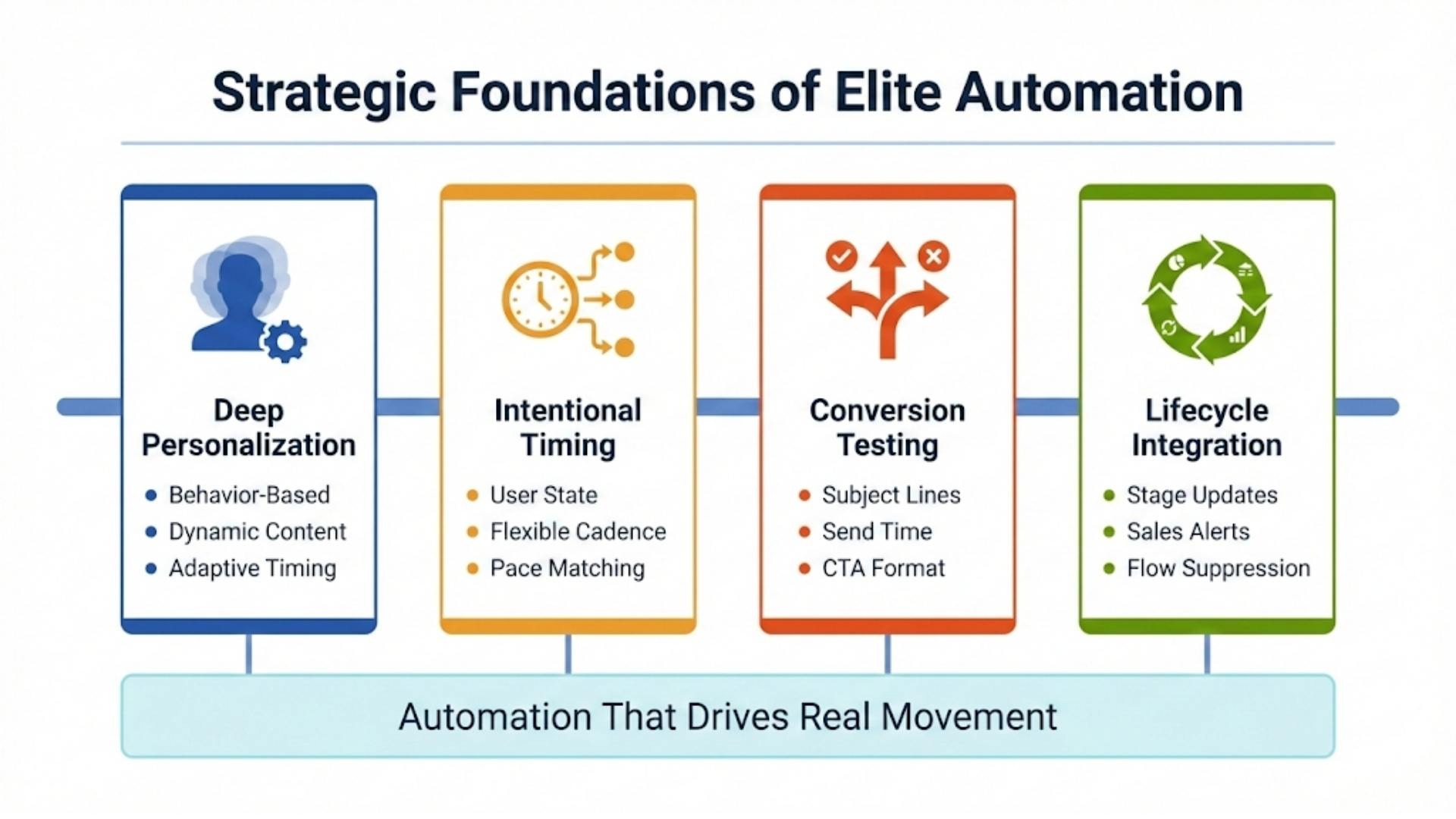
If all you’re doing is inserting {first name}, you’re doing surface-level work. Real personalization means:
- Contextual messaging based on past behavior (“You read our pricing page, here’s what to know next”)
- Dynamic content that shifts based on persona, industry, or funnel stage
- Adaptive timing so messages arrive at the right time of day and frequency for that individual
Platforms like Customer.io or Braze shine here, but you can approximate it in HubSpot or ActiveCampaign with smart lists and content blocks.
Timing Isn’t Just a Delay. It’s a Decision
When I structure workflows, I map the psychological and logistical state of the user:
- Is this a moment of excitement? Hit fast.
- Is this a moment of consideration? Space it out.
- Is this a re-engagement? Bring a bold subject line, not a hard sell.
Don’t default to “wait 2 days.” Test intervals. Let the user’s pace dictate yours.
A/B Testing Shouldn’t Be an Afterthought
I require every client workflow to have at least one variable tested:
- Subject line
- Send time
- CTA placement
- Format (plain text vs. HTML)
And we don’t just track opens or clicks. We monitor goal conversions (i.e., did they move forward in the funnel?). That’s the only metric that matters.
Lifecycle Integration Is Non-Negotiable
Your automation should inform lifecycle stage changes, not just follow them.
Example: if a user books a demo from a nurture flow, we:
- Update their lifecycle stage to SQL
- Remove them from all TOFU workflows
- Trigger sales alerts and internal Slack pings
- Move them to an onboarding or sales support sequence
This requires tight integration between automation tools and your CRM. If you’re not syncing these, you’re flying blind.
Choosing the Right Automation Tool Isn’t About Brand, It’s About Fit
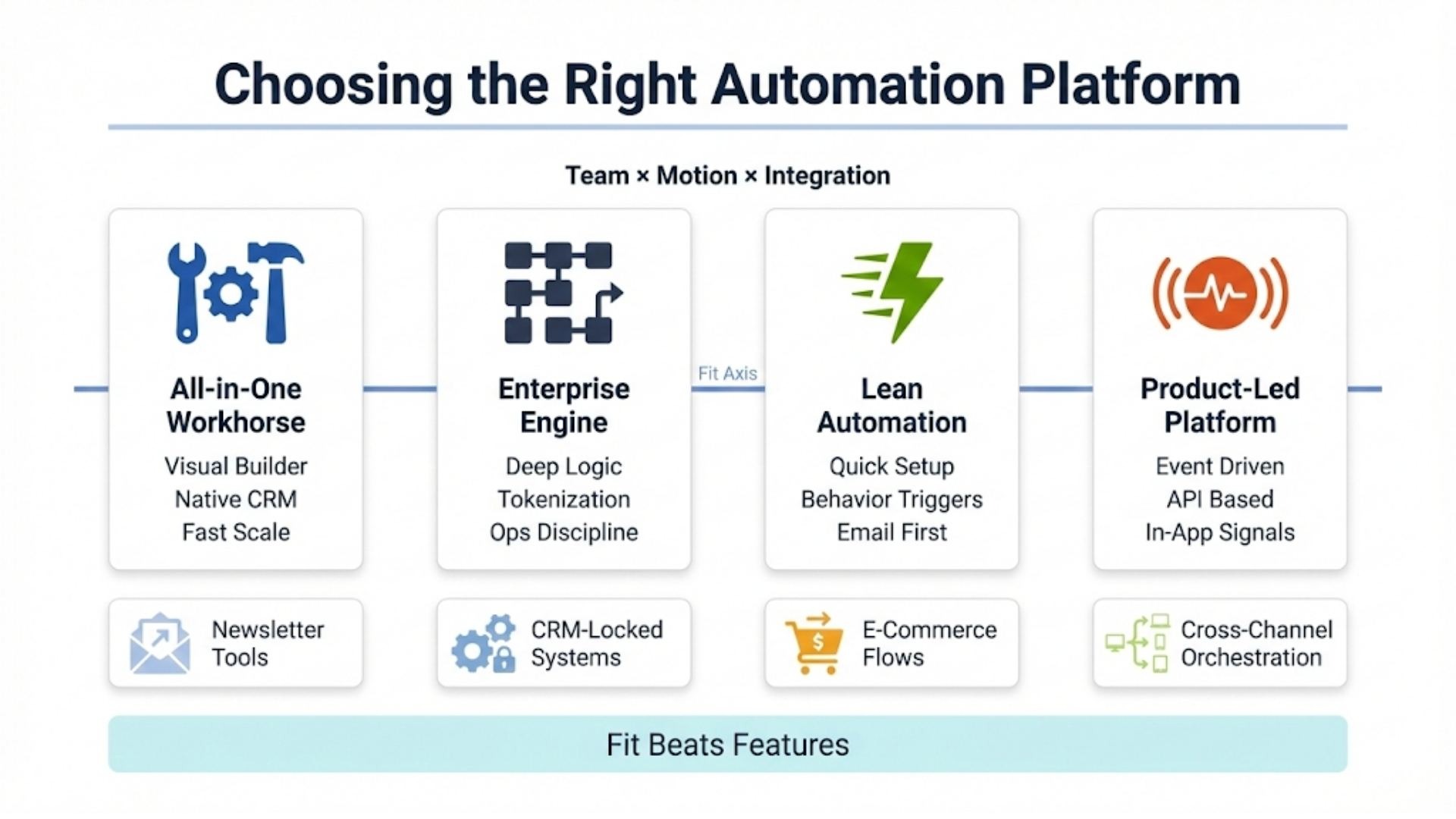
I’ve worked with just about every automation platform on the market, from nimble email-first tools to heavyweight enterprise systems. Here’s how I advise clients: choose the tool that matches your marketing motion, team skillset, and integration needs, not the one with the flashiest features or highest price tag.
HubSpot: The All-in-One Workhorse for SMBs and Mid-Market
Why I recommend it: HubSpot’s visual workflow builder makes it easy to build logic without code. It integrates natively with its CRM, which is a game-changer if you want sales and marketing aligned. You can build nurturing flows, internal alerts, smart lists, lead scoring, and even deal-stage automation, all in one place.
Limitations: Costs ramp up fast as your contact list grows. Reporting is decent but lacks the depth enterprise orgs need.
Who it’s for: B2B companies, SaaS firms, agencies scaling past spreadsheets, or teams without heavy dev support.
Marketo (Adobe): The Enterprise Standard with Steep Learning Curve
Why it works: Marketo is built for flexibility and depth. You can tokenize workflows, use dynamic content across channels, and build modular campaigns at scale. But it requires discipline. Poor foldering or naming will burn you.
Limitations: The UI is dated. If your team isn’t process-oriented, this will get messy fast.
Who it’s for: Large B2B orgs with high lead volume, long sales cycles, and a dedicated marketing ops team.
ActiveCampaign: The Best Kept Secret for Lean but Smart Automation
Strengths: Fast implementation, behavior-based triggers, and strong email performance. I use this with clients who don’t need a full CRM stack but want reliable sequencing, scoring, and reporting.
Who should use it: SMBs and mid-market firms with focused campaigns, especially in B2C or coaching/info products.
Customer.io: For Product-Led and Engineering-Heavy Teams
Best feature: Event-driven workflows that respond to real-time user actions inside your app or product. You can use APIs to trigger sequences based on usage, cancellations, or onboarding progress.
Ideal for: SaaS, marketplaces, or any business with in-app actions and developers on hand.
Mailchimp, Pardot, Klaviyo, Braze
- Mailchimp: Fine for newsletters. Not great for deep automation.
- Pardot (Salesforce): Decent if you’re already deep in the Salesforce ecosystem, but clunky otherwise.
- Klaviyo: A top choice for e-commerce. Its flows for cart abandonment, replenishment, and customer lifecycle are unmatched in retail.
- Braze: Excellent for cross-channel orchestration, email, push, SMS, but it demands technical integration and planning.
Real-World Workflow Templates: Fully Explained
Too many “templates” online are just boxes with arrows and vague names like “Email 1.” Below, I’ll walk you through actual workflow structures I’ve built, with goals, context, and decisions explained.
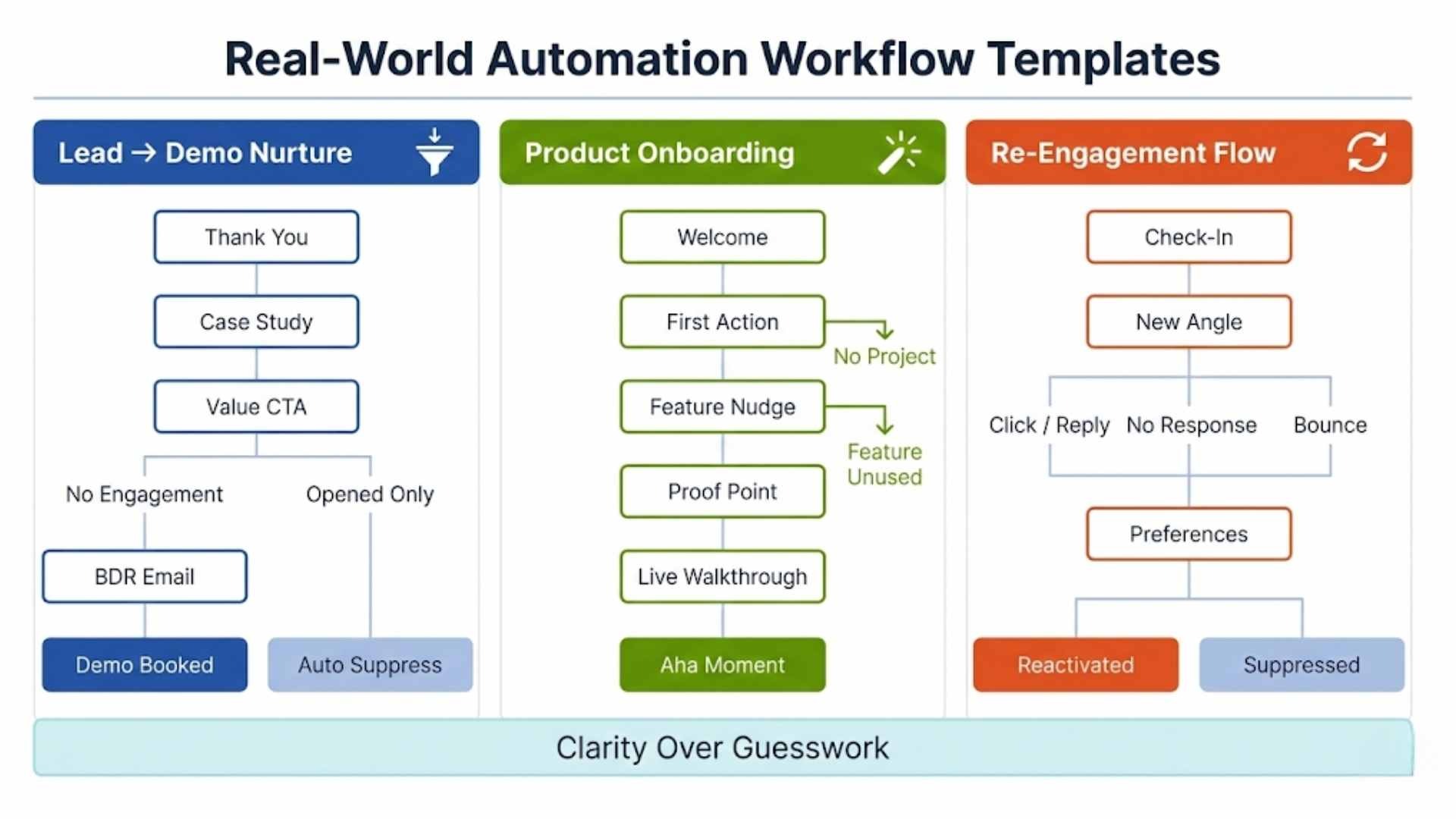
1. Lead Nurture to Demo Conversion (SaaS, B2B)
Objective: Front-load touches in the first ~10 business days, then move to lower-frequency nurture.
Trigger: Download of a gated asset (e.g., whitepaper or comparison guide).
Workflow Flow:
- Immediate Thank You Email: Provides the asset and sets the stage: “This guide is just the beginning…”
- Day 2: Send a related case study. Use smart content to match the industry of the lead if known.
- Day 4: If no engagement, send a value-based CTA like “See how teams like yours solve this in 30 minutes” → links to demo calendar.
- Day 6: If opened but not clicked → use a plain-text email from a BDR introducing themselves.
- Exit if demo booked. Otherwise, auto-suppress after 14 days.
Key insight: The mix of automated marketing messages and lightly-personalized plain-text emails drives conversion. We A/B tested visual emails vs. plain ones. In A/B tests, plain-text/plain-style emails often win on clicks vs. heavier HTML, e.g., HubSpot reported 42% more clicks in one test.
2. Product Onboarding Series (Freemium SaaS)
Objective: Drive users to “aha moment” within the first 7 days post-signup.
Trigger: Free account creation.
Workflow Structure:
- Hour 0: Welcome email with short video → “Here’s what to do first.”
- Day 1: Behavioral check → If the user hasn’t created the first project, send a step-by-step checklist with embedded CTAs.
- Day 3: Highlight feature they haven’t touched (via segmenting by event data)
- Day 5: User testimonial that showcases ROI within the first week
- Day 7: Invite to live onboarding webinar or recorded walkthrough
Tool Used: Customer.io with in-app event triggers.
Conversion Insight: First-week time-to-value/activation is a leading indicator for longer-term outcomes. Amplitude reports that products delivering value in the first week see better longer-term performance; they note 69% of products with strong early activation were also strong three-month retention performers.
3. Re-engagement Flow (Cold MQLs)
Goal: Re-engage leads who have been inactive for 90+ days while protecting deliverability by reducing sends to unresponsive contacts.
Trigger: No opens/clicks/replies for 90+ days (and the contact isn’t already unsubscribed, disqualified, or suppressed).
Workflow Flow
Email 1 (Day 0):
Subject: “Still working on [problem]?”
Value-led message: “Here’s what’s changed / a new resource / a quick update you might’ve missed.” (No pressure, no aggressive CTA.)
If unopened → wait 5 days → Email 2:
New subject line + a different angle (e.g., content upgrade, updated guide, new case study). The purpose is to test whether it was a subject/timing mismatch, not to spam.
If still unopened → final email (Day 10–14):
Preference-based message:
- “Want fewer emails?” (opt-down frequency)
- “Choose topics” (preference center)
- “Unsubscribe” option is clearly available
Exit Rules
- If they click or reply: move them back into an active nurture track (they’ve re-engaged).
- If they bounce: suppress/remove immediately (list hygiene).
- If there’s no activity after the final email: suppress them (soft suppress or hard suppress, depending on your list policy).
Pro Tip (List Hygiene): Re-engagement flows are also list-cleaning flows. The Campaign Monitor reporting guide recommends using an inactivity threshold, after 90 days of silence, to re-engage or suppress unresponsive subscribers.
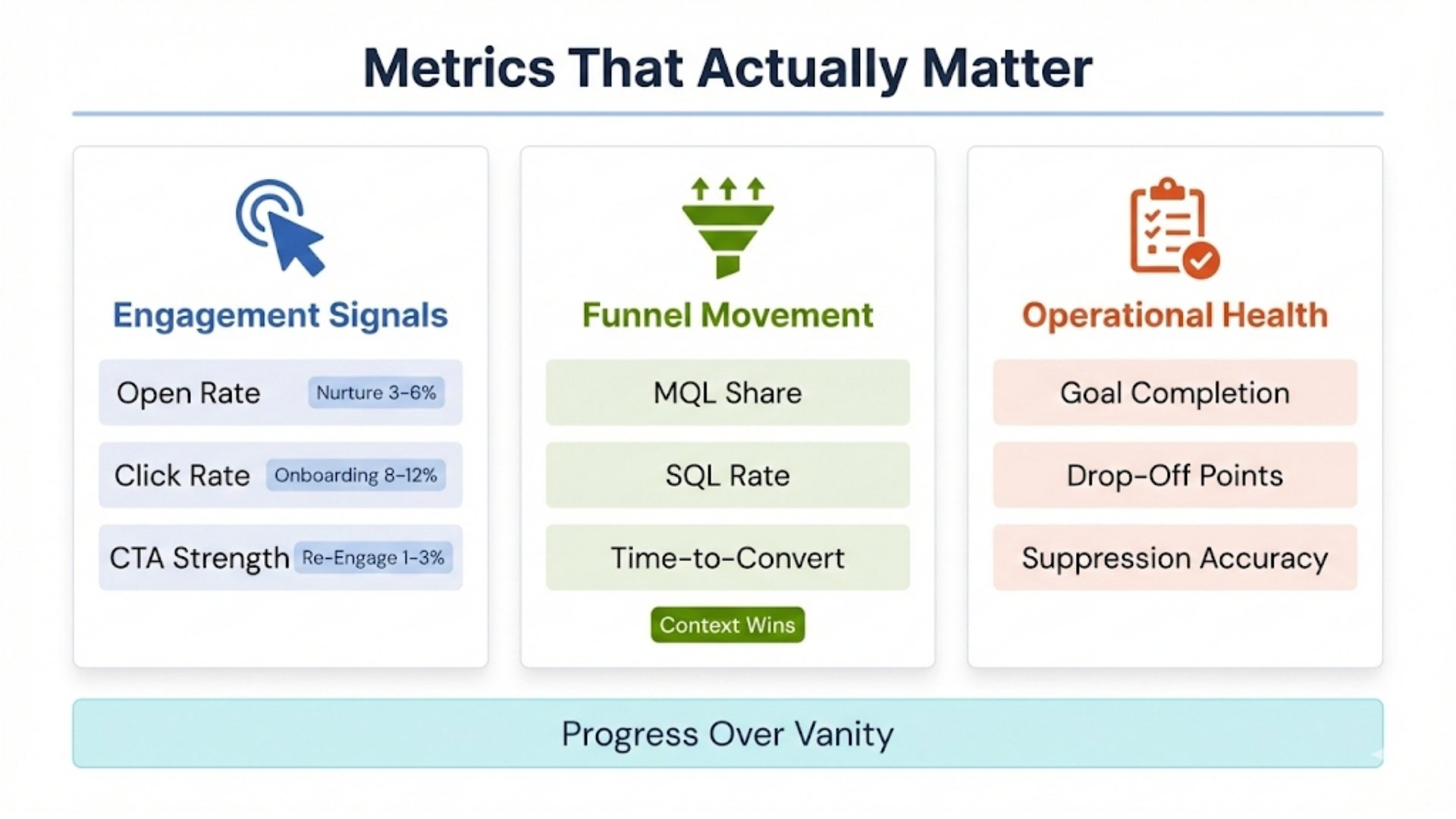
Metrics That Matter: and How I Actually Use Them
Here’s what I look at, not vanity numbers, but progressive performance indicators.
Engagement Metrics
- Open rate: Mostly for monitoring subject line relevance and deliverability (20–40% expected depending on segment)
- Click rate (CTR): Indicates actual engagement and CTA strength. Benchmarks vary:
- Nurture flows: 3–6%
- Onboarding: 8–12%
- Re-engagement: 1–3%
If I see CTRs drop below 2%, it’s time to re-evaluate copy and targeting.
Funnel Progression Metrics
I track workflow impact by tying it to CRM funnel movement:
- % of MQLs generated from automation-driven campaigns
- SQL conversion rate from nurtured leads vs. direct/demo leads
- Time-to-conversion vs. control (non-automated flows)
Example: In one B2B client’s funnel, we saw nurtured leads convert at 18% higher rate to opportunity and 27% faster than cold outbound. That’s not magic, it’s context.
Operational Metrics
- Goal conversion per workflow (not just emails): Did the user complete the defined journey?
- Drop-off points: Where do users stall or exit?
- Suppression accuracy: Are disqualified leads being removed or nurtured wastefully?
Real Case Studies With Lessons, Not Just Numbers
Yubi (B2B SaaS, via HubSpot)
According to the HubSpot Yubi case study, Yubi increased meetings booked by 400% and improved lead conversion rates by 50% after implementing structured marketing automation and clearer demand capture.
Lesson: Funnel clarity and contextual follow-up matter more than volume. When workflows are tied to how prospects engage (not just that they engaged), sales conversations happen faster and more often.
Webinar Follow-Up Segmentation (ON24 + MarketingSherpa)
According to ON24, high-performing webinar programs segment follow-up based on attendance behavior (attended vs. no-show), using different assets and CTAs for each group.
Supporting this, a MarketingSherpa case study reported a 422% lift in webinar attendance after shifting from generic webinar promotion to more targeted, relevance-driven messaging.
Lesson: Behavior should dictate the next CTA. Attendees are ready to continue the conversation; no-shows need easy re-entry (recordings, flexible timing), not pressure.
Heat Transfer Warehouse (Ecommerce, Email + SMS via Klaviyo)
According to the Klaviyo Heat Transfer Warehouse case study, the brand achieved a 12% overall revenue lift, with 24% of total revenue attributed to email and SMS, and a 25% increase in abandoned-cart engagement after introducing multi-channel recovery flows.
Lesson: Multi-channel works best when it’s throttled by behavior. High-intent moments (like cart abandonment) justify faster follow-ups, but repeat abandoners and first-time visitors should not receive the same intensity or cadence.
FAQ: Advanced Marketing Automation Workflows
1. Can I use AI to personalize marketing automation workflows?
Yes, but carefully. Most automation platforms now offer some level of AI (e.g., subject line prediction, send-time optimization, or dynamic content recommendations), often powered by specialized AI automation tools designed to optimize automation performance at scale. However, full AI-driven workflow logic (like auto-creating paths or writing copy) is still experimental and requires supervision.
Pro Tip: Use AI to assist, not automate decision-making. For example, AI can generate email variants or subject lines, but you should A/B test them before rolling them out to your whole audience.
2. What kind of team structure do I need to maintain sophisticated workflows?
As you scale, workflow management is no longer a one-person job. Here’s what I recommend for mid-size to enterprise teams:
- Marketing Ops: Owns logic, QA, segmentation, scoring
- Content Strategist: Crafts copy per segment and funnel stage
- Sales/RevOps Liaison: Aligns workflow with handoff and CRM sync
- Data Analyst (optional): Tracks conversion and segment performance
Even small teams should assign workflow ownership clearly. Automation needs active management, not passive oversight.
3. How do I prevent duplicate or conflicting workflows from overlapping?
This is a classic pitfall, especially in large orgs with multiple builders. You need:
- A workflow inventory (a shared doc or tool that lists all active workflows, triggers, and goals)
- Naming conventions with owner tags, e.g., ONB_FreeTrial_V1_Mary
- Suppression lists and mutually exclusive conditions to prevent multiple workflows from acting on the same contact at once
- Regular audits, ideally quarterly
Most tools lack native collision detection, so this is a human process unless you use enterprise ops platforms like Workato or Tray.io to orchestrate dependencies.
4. How do I localize workflows for multiple languages or regions?
You should never duplicate full workflows per language. Instead:
- Use conditional logic for dynamic content blocks
- Use smart lists to segment by region or language preference
- Store content variables (copy, links, CTAs) in central tokens or reusable modules if supported (e.g., in Marketo or Iterable)
Also, local legal standards matter. In Germany, for instance, you need a double opt-in. In Canada, CASL has stricter unsubscribe rules. Always check with local counsel before launching international workflows.
5. What are the best practices for integrating automation with CRM and product data?
Solid workflows need solid inputs. That means:
- CRM integration (Salesforce, HubSpot, etc.): for accurate lifecycle stages, deal triggers, contact ownership, and lead scores
- Product analytics platforms (like Segment, Mixpanel, or Amplitude): to trigger workflows based on product usage
- Webhook/API setups: Webhook/API setups: to allow automation tools to react to external events or systems (e.g., webinar attendance, billing updates), often orchestrated through no-code and low-code workflow automation frameworks.
Always define a source of truth. If your CRM and product analytics disagree about lead status or trial end date, you’ll confuse users with inconsistent messaging.
6. How do I measure the long-term ROI of automation workflows?
Go beyond email metrics. Tie workflows to pipeline and revenue outcomes:
- Use UTM parameters and campaign IDs for attribution
- Track lifecycle velocity (e.g., time from MQL to SQL pre- and post-automation)
- Look at customer LTV uplift for automated onboarding or upsell flows
- Analyze customer retention and churn rates for lifecycle communication
If your attribution modeling supports it, build reports that show workflow-driven funnel acceleration.
7. How do I test a new workflow without impacting real customers?
Use a sandbox environment if your platform supports it (like in Marketo or Salesforce Marketing Cloud). If not:
- Create a test segment using internal email addresses
- Use “dummy” data to simulate triggers (e.g., submitting forms, tagging users manually)
- Temporarily remove any CRM updates or notifications to sales while testing
Be cautious with time delays; test with reduced wait times (e.g., 5 minutes instead of 2 days) to speed QA cycles.
8. Should I build one master workflow with branches or multiple smaller workflows?
This depends on your complexity and platform:
- Master workflows offer easier visibility, centralized logic, and better flow control, but can get heavy and hard to debug.
- Modular workflows (one per purpose) are easier to manage individually but require careful entry/exit condition setup and suppression rules.
The hybrid approach works best: Build modular workflows but manage them with a central documentation system and naming strategy.
9. Can automation workflows help with account-based marketing (ABM)?
Absolutely. For ABM, workflows become hyper-targeted and multi-channel:
- Trigger sequences when an account reaches a certain score or intent level
- Personalize based on account attributes (industry, tech stack, revenue)
- Use custom Slack/CRM alerts to notify reps in real-time
- Include direct mail, ads, and LinkedIn outreach in tandem with email/SMS workflows
Tools like Demandbase, 6sense, or RollWorks integrate with your automation platform to enrich account targeting and orchestration.
10. How do I manage compliance (GDPR, CCPA) within workflows?
Compliance isn’t optional, and automation introduces risk if unchecked.
Best practices:
- Always respect contact consent fields before sending any message
- Log proof of opt-in (e.g., date, IP, source)
- Include dynamic footers and unsubscribe options
- Build geo-based suppressions (e.g., exclude EU contacts if not GDPR-compliant)
- Ensure data is only processed in approved regions if your platform stores user data
Run periodic audits with your legal or privacy teams to validate your automation flows.
Final Thoughts: Automation Is a Living System
The biggest mistake I see teams make is treating automation like a “project.” Something to set up, run, and check off.
It’s not.
Your workflows are living, evolving systems.
You need to revisit:
- The logic (are entry/exit conditions still accurate?)
- The copy (does it reflect the current value proposition?)
- The pacing (is it aligned with the buying cycle or user behavior?)
Every quarter, I run an audit for clients:
- Where are we fatiguing users?
- Where are we ignoring signals?
- Where are we missing lifecycle triggers?
Workflows are a source of leverage, not just labor savings. If you treat them with the respect they deserve, they will scale your revenue engine while you sleep.
Let’s Talk About Building Smarter, AI-Driven Marketing Workflows
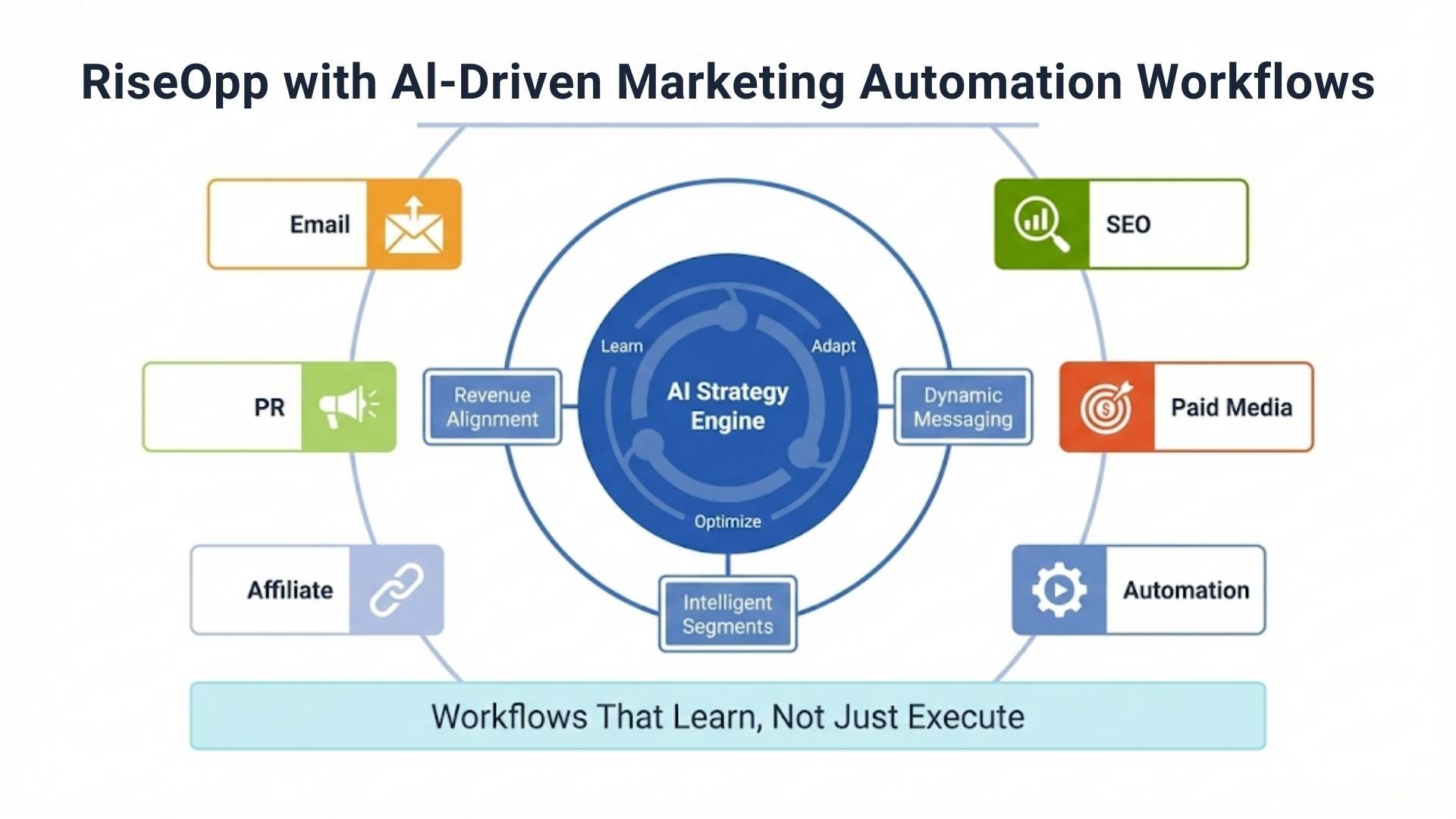
At RiseOpp, we believe automation shouldn’t just follow rules; it should adapt, optimize, and evolve with your business. That’s why we don’t stop at traditional workflow design. We integrate the power of AI-driven strategy to build smarter, higher-converting systems across your entire marketing stack.
As a Fractional CMO and SEO services firm, we help companies like yours develop and execute sophisticated marketing programs across every major channel, from email and SEO to paid media, affiliate, and PR. But what truly sets us apart is how we layer strategic AI thinking across each initiative.
If you’re looking to modernize your marketing motion, align your messaging with revenue goals, or build high-performance workflows that learn, not just execute, our team is here to lead and deliver.
Learn more about how we help companies implement cutting-edge AI marketing strategies that work across email, SEO, paid ads, and automation to drive real, measurable results.
Comments are closed